Show the local llama.cpp router's state in opencode with ocmon
Contents
Install ocmon, run it in a terminal, and wire it into opencode as a sidebar panel and home-screen footer line that show what the local llama.cpp router is doing: loading, ready, sleeping or failed, prompt progress with an ETA, generation speed, and the iGPU's load, memory, power and temperatures.
- Tested on
- Ryzen 7 PRO 6850U laptop (Radeon 680M), Fedora 44, Go 1.26.9, opencode 1.19.3, llama.cpp b11292 Vulkan build, ocmon commit f067f45 (2026-10-21). The logs of that evening were not kept: on 2026-11-05 every flag, default and output format below was checked against the source at f067f45, and the router-down outputs in steps 3, 4 and 9 were re-run on another AMD box (Ryzen 7 8845HS, Radeon 780M).
Version: steps 1 and 5 pin f067f45. The repository's
mainmoved on the next day (new-list,-load,-unload,-stopflags; an unreadable log no longer gives theerrorstate; different load-failure text), so@latestinstalls a version this manual does not describe. - Not verified
- the public plugin with its
tui.jsonoptions (steps 6–8) was not run in opencode; what ran on this box was an earlier copy of the same plugin with the binary path written into the file. No request ran against the public build: the router was down, so its busy-state output comes from replaying my router log against a stubGET /models(Field notes). The waybar module (step 9) was not run. Toasts were not captured. - Needs
- the router and the
ocwrapper from Serve local models to opencode with the llama.cpp router, with the router's output going to a log file; Go 1.24 or newer; an AMD GPU on theamdgpudriver for the hardware line (everything else works without it). - Time
- 20 min.
- Risk
- low. ocmon only reads the log, sysfs and the router's
GET /models; it calls/slotsonly while a request is already running, withautoload=false. It writes one file,~/.cache/ocmon/gen.json. The opencode change is one environment variable in your wrapper.
Before you start#
- The router writes llama.cpp's slot timing lines to its log. ocmon reads them for prompt progress and speeds; check the log has them (after at least one prompt has run):Expected: one
grep -m1 'prompt processing, n_tokens' <ROUTER_LOG>slot print_timingline withprompt processing, n_tokens = …, progress = …; the Verify section shows one from my log. The[<port>]prefix on it is the port of the model instance that wrote the line. Lines without it come from the router itself. Without a log, ocmon shows model states only. - Check that the
amdgpudevice exposes the files ocmon reads:ocmon picks the first$ grep -l amdgpu /sys/class/drm/card*/device/uevent /sys/class/drm/card1/device/uevent $ ls /sys/class/drm/card1/device/gpu_busy_percent /sys/class/drm/card1/device/mem_info_gtt_used /sys/class/drm/card1/device/mem_info_vram_used /sys/class/drm/card1/device/gpu_busy_percent /sys/class/drm/card1/device/mem_info_gtt_used /sys/class/drm/card1/device/mem_info_vram_used/sys/class/drm/card*/devicethat hasgpu_busy_percent;-devoverrides it. Power and temperatures come from the hwmon sensors namedamdgpuandk10temp, found by name. - Check Go (the module's
go.modsaysgo 1.24):go versionmust printgo1.24or newer. - Placeholders used below:
<ROOT>: the prerequisite manual's working directory (itsocwrapper is<ROOT>/serve/oc).<ROUTER_LOG>: absolute path of the router's log file (in the prerequisite manual,ocappends the router's stdout and stderr to it).<OCMON>: absolute path of the installed binary, by default~/go/bin/ocmon, written out in full: the plugin starts it with Node'sexecFile, which does not expand~.<SRC>: absolute path of a directory you create for the plugin file (step 5).<TUI_JSON>: thetui.jsonused only by the wrapper. The prerequisite manual'socalready pointsOPENCODE_TUI_CONFIGat$ROOT/serve/opencode-tui/tui.json; use that path, or change the line in step 7.
- Backups: copy your
ocwrapper before step 7 (cp <ROOT>/serve/oc <ROOT>/serve/oc.bak, where<ROOT>is the prerequisite manual's working directory). Nothing else is changed. Your global~/.config/opencode/tui.jsonis not touched.
Steps#
Install ocmon at the tested version. The source is public at gitlab.com/myrants-oss/ocmon (MIT), and
go installfetches it from the Go module proxy, so there is nothing to clone. It is onemain.gowith no dependencies outside the standard library. The version string pins commit f067f45 (Scope, Version):go install gitlab.com/myrants-oss/ocmon@v0.0.0-20261021182238-f067f458af51Without
GOBINthe binary goes to~/go/bin. On 2026-10-21@lateststill resolved to this version; I setGOBINto keep it out of myPATHfor the test:$ GOBIN="$PWD/bin" go install gitlab.com/myrants-oss/ocmon@latest $ go version -m bin/ocmon | head -3 bin/ocmon: go1.26.9-X:nodwarf5 path gitlab.com/myrants-oss/ocmon mod gitlab.com/myrants-oss/ocmon v0.0.0-20261021182238-f067f458af51 h1:ruhYlOpc4JPqKYVhtGPKsxWarAhRMrV0c4OZqgbGh0A=Expected:
go installprints nothing, or onego: downloading …line on the first fetch, andgo version -mnames the module with thev0.0.0-20261021182238-f067f458af51version.Check the flags.
$ bin/ocmon -h
Usage of bin/ocmon:
  -dev string
    	amdgpu sysfs device dir (env OCMON_DEV; default: first card with gpu_busy_percent) (default "/sys/class/drm/card1/device")
  -i duration
    	refresh interval (default 1s)
  -json
    	print one JSON object (class, line, side, detail) and exit
  -log string
    	router log file (env OCMON_LOG); without it only model states are shown
  -url string
    	router base URL (env OCMON_URL) (default "http://127.0.0.1:8080")
  -waybar
    	print one JSON line for a waybar custom module and exit
Flags win over the
OCMON_*variables. TheREADME.mdin the module directory (step 5) has the full table; the README on the repository page describes the later version. What each part reads:-url:GET <url>/modelson every refresh, andGET <url>/slots?model=<name>&autoload=falseonly while the log shows a running request (for the live generated-token count).-log: the last 1 MiB of the log on every refresh.-dev:gpu_busy_percent,mem_info_gtt_used,mem_info_vram_used. A missing file prints?. The busy figure is one reading per refresh, not an average.-waybarprints{"class","text","tooltip"}with an emptytextwhen the router is down;-jsonprints{"class","line","side","detail"}, wheresideholds the short lines for opencode's sidebar.
Expected: the six flags above, with the
envnames in the help text.Run it once in JSON mode.
<OCMON> -json -log <ROUTER_LOG>With no router on port 8080 (re-run 2026-11-05 on the 780M box):
$ bin/ocmon -json
{"class":"down","detail":["GPU 27%  GTT 1772 MiB  VRAM 475 MiB  40.1 W  CPU 75°C  GPU 56°C","router: Get \"http://127.0.0.1:8080/models\": dial tcp 127.0.0.1:8080: connect: connection refused"],"line":"router down","side":null}
Expected: one JSON line whose
classis one of the states below.errorwithrouter up, log unreadablemeans the-logpath is wrong (Failure modes, row 2).classWhen lineprinteddownGET /modelsfailsrouter downerrorlog unreadable, or the log shows a load error and no model loadedfor the current instancerouter up, log unreadable/<model> FAILED to load (see router.log)idleevery model is unloadedidle, no model loadedloading/modelssaysloadingornith-35b loading…sleeping/modelssayssleepingornith-35b sleeping (memory freed)loadedloaded, but no -log, or the newest instance in the log is another modelornith-35b loadedpromptrequest running, prompt not finished ornith-35b reading prompt ██░░░░░░░░░░░░░░░░░░ 11% 2048/18618 tok 145 t/s · ~114 s leftgenrequest running, prompt done <model> generating <n> tok <rate> t/s(…instead of the rate on the first sample)readyloaded, no request running ornith-35b ready last: prompt 21 tok @ 11 t/s, gen 263 tok @ 17.7 t/s, ctx 18353The
linevalues with a model name come from a replay of my router log through this binary (Field notes, 21:24); that output was not kept, and each value matches the format string in the source.idle,genand the load-failure text are from the source and were not observed. On a load failure the sidebar's second line is the fixed textsee serve/router.log, whatever your log path is.The
prompttotal isn_tokens / progressfrom the newest progress line, and the ETA is the remaining tokens divided by the running rate. llama.cpp printsprogresswith two decimals, so both are estimates (Field notes: 114 s shown, about 139 s real).Run the full-screen view.
<OCMON> -log <ROUTER_LOG>One frame with no router on port 8080 (re-run 2026-11-05 on the 780M box):
ocmon  11:05:12   (ctrl-c to quit)

  router down

  GPU 27%  GTT 1772 MiB  VRAM 475 MiB  46.9 W  CPU 75°C  GPU 56°C
  router: Get "http://127.0.0.1:8080/models": dial tcp 127.0.0.1:8080: connect: connection refused
Expected: the screen redraws every
-i(1 s). The line under the clock is the samelineas in JSON mode; below it are the hardware line and either the router error or the model list (models: <id>:<status> …).GotchaCtrl-C leaves the cursor hidden
ocmon hides the cursor and restores it in a deferred call, which does not run when Ctrl-C or SIGTERM kills the process. Run
tput cnormafterwards to get the cursor back.Get the plugin file. The opencode plugin is
opencode-plugin/llm-status.tsxin the module. Commit f067f45 is no longer on the repository's branch, so take it from the same module version as the binary:go mod download -json gitlab.com/myrants-oss/ocmon@v0.0.0-20261021182238-f067f458af51It prints a JSON object whose
"Dir"is the module's directory in Go's module cache (read-only). Copy the plugin out of it, with<DIR>= thatDirvalue:mkdir -p <SRC>/opencode-plugin cp <DIR>/opencode-plugin/llm-status.tsx <SRC>/opencode-plugin/Expected:
<SRC>/opencode-plugin/llm-status.tsxexists, from the same version as the binary.What it does: runs
<bin> -json <args…>everyintervalMs(skipping a tick while the previous call still runs, 3 s timeout), fills two opencode slots,sidebar_content(session view) andhome_footer(home screen), and hides both when ocmon fails or reportsdown. It raises a toast on three transitions: loading to ready, any state to sleeping, any state to error. opencode loads the.tsxfile as it is; there is no build step.Write
<TUI_JSON>with the plugin's absolute path and its options. [UNVERIFIED: this options form was not run in opencode on this box.]{ "$schema": "https://opencode.ai/tui.json", "plugin": [ ["<SRC>/opencode-plugin/llm-status.tsx", { "bin": "<OCMON>", "args": ["-log", "<ROUTER_LOG>"], "intervalMs": 1000 }] ] }bindefaults toocmonfrom opencode'sPATH; an absolute path avoids depending on it.argsgo after-json; add"-url", "…"if the router is not on127.0.0.1:8080.intervalMsbelow 250 is ignored (1000 is used).Pass that file to opencode from your wrapper only. The
opencodecall inocmust carryOPENCODE_TUI_CONFIG=<TUI_JSON>. The prerequisite manual'socalready has the line; if your wrapper does not, add it. The end of myoc:OPENCODE_DISABLE_CLAUDE_CODE=$claude_off \ OPENCODE_TUI_CONFIG="$ROOT/serve/opencode-tui/tui.json" \ OPENCODE_CONFIG="$ROOT/serve/opencode-local.json" opencode "$@"opencode's docs say
OPENCODE_TUI_CONFIGpoints to a custom TUI config file. [UNVERIFIED: that opencode 1.19.3 merges it with the globaltui.json, so global TUI settings still apply, was not checked against its source.] A plainopencode(cloud sessions) does not get the variable and shows no panel.Start
ocand send a prompt. [UNVERIFIED: with the public plugin and options form; see Scope.] Expected: the home screen showslocal LLM: <line>at the bottom, and the session sidebar shows aLocal LLMsection (see Verify).Optional: add a waybar module. [UNVERIFIED: not run on this box; there is no ocmon module in my waybar config.] Built from the waybar 0.15.0
waybar-custom(5)man page. Add"custom/ocmon"to one of themodules-*lists and define it:"custom/ocmon": { "exec": "<OCMON> -waybar -log <ROUTER_LOG>", "return-type": "json", "interval": 1, "hide-empty-text": true }classbecomes a CSS class, so#custom-ocmon.prompt,#custom-ocmon.errorand the other class names from step 3 can be styled instyle.css.-waybaroutput with no router on port 8080 (re-run 2026-11-05 on the 780M box):$ bin/ocmon -waybar {"class":"down","text":"","tooltip":"GPU 27% GTT 1772 MiB VRAM 475 MiB 46.4 W CPU 75°C GPU 56°C\nrouter: Get \"http://127.0.0.1:8080/models\": dial tcp 127.0.0.1:8080: connect: connection refused"}
Verify#
While the model reads a prompt, the sidebar shows the section with progress and ETA. This capture is from my earlier copy of the plugin; the public build prints the same text for the same log line (Field notes, 21:24):
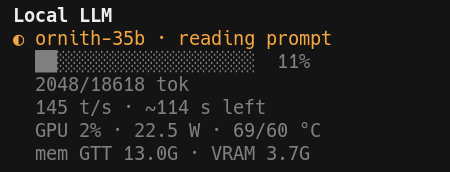
The numbers come from this router log line, the first progress line of an 18.8k-token prompt:
[33621] 10.04.886.745 I slot print_timing: id 0 | task 716 | prompt processing, n_tokens = 2048, progress = 0.11, t = 14.12 s / 145.07 tokens per second
2048 / 0.11 = 18618 tokens total, and (18618 − 2048) / 145.07 = 114 s left, as shown.
Undo / rollback#
- Restore the wrapper:
cp <ROOT>/serve/oc.bak <ROOT>/serve/oc(or delete theOPENCODE_TUI_CONFIG=…line). opencode stops loading the plugin on its next start. - Delete
<TUI_JSON>,<SRC>and<OCMON>. - Delete
~/.cache/ocmon/($XDG_CACHE_HOME/ocmon/if you set that variable). It holdsgen.json, the generation-rate sample kept between one-shot runs.go installandgo mod downloadalso left the module source in Go's module cache (go clean -modcacheclears all of it, for every module). - If you added the waybar module, remove
"custom/ocmon"from the config and reload waybar.
[UNVERIFIED: rollback not exercised; per the source, gen.json and its .tmp are the only files ocmon writes.]
Failure modes#
| Symptom (exact message) | Cause | Fix |
|---|---|---|
"line":"router down", detail dial tcp 127.0.0.1:8080: connect: connection refused; the opencode panel and footer are hidden | Router not running, or listening elsewhere | Start it with oc, or pass -url |
"class":"error", "line":"router up, log unreadable", detail open <path>: no such file or directory | -log (or OCMON_LOG) names a file that does not exist | Fix the path, also in the plugin's args |
ornith-35b loaded while a prompt is running, no progress | No -log given, so only /models is read | Pass -log <ROUTER_LOG> |
GPU ?% GTT ? MiB VRAM ? MiB while watts and temperatures are shown | -dev points at a card directory that does not exist (here card0 on a box with only card1) | Drop -dev, or pass the right directory |
| Cursor gone after quitting the full-screen view | Ctrl-C kills ocmon before it restores the cursor | tput cnorm |
Field notes#
2026-10-21 21:23–21:34, Ryzen 7 PRO 6850U laptop (Radeon 680M), Fedora 44, Go 1.26.9, ocmon f067f45: installed from the public module with
go install;go test ./...in a clone passed. The router was down all evening (another experiment held its unit name and port 8080 refused), so every live output that evening was thedownstate. To check the text of each state I replayed my router log through the installed binary: a small stub answeredGET /models, and the log was cut at a chosen line. Cut at the first progress line of task 716, it printed2048/18618 tok 145 t/s · ~114 s left, the numbers in the sidebar screenshot. Without-logthe same state readornith-35b loaded;OCMON_LOGworked like-log; a missing log gaverouter up, log unreadable;-dev /sys/class/drm/card0/devicegave?for busy, GTT and VRAM. 20-jsoncalls took 4.8 ms median (4.0–5.4) with the router down and 10.6 ms (9.5–12.0) in the replay, which read a 106 KB cut of the log; not timed against a running router. Undertimeout -s INT(Ctrl-C) the full-screen view wrote the hide-cursor sequence once and the show-cursor sequence zero times.2026-10-21, same box, llama.cpp b11292 (the router's
llama-server, file unchanged since 2026-09-30), opencode 1.19.3, sidebar screenshot (task 716): the ETA said ~114 s at 11 %. The log's own timer went from 14.12 s at that line to 153.38 s at the last progress line, so about 139 s were left: the prompt was 18,857 tokens, not 18,618, and the rate fell from 145 to 123 t/s as the context grew.2026-10-21, same log: every prompt longer than 2048 tokens reports progress in steps of 2048 tokens (2048, 4096, 6144, …; the log has six such prompts; the one on lfm2.5-8b starts at 4096), then in smaller steps for the last part (task 716: …16384, 16543, 16793, 18341, 18841, 18853). On the five ornith-35b prompts, at about 145 t/s, that is one update every 14–18 s, so the bar moves in steps.
2026-10-21 21:02, same box, opencode 1.19.3: first run of the plugin in an
ocsession, from my private copy (binary path written into the file, no options). The home screen footer showedlocal LLM: ornith-35b ready last: prompt 11 t/s, gen 17.7 t/s (263 tok), ctx 18353, an earlier format of thereadyline; the current one adds the token counts.2026-11-05, Ryzen 7 8845HS box (Radeon 780M), Fedora 44, Go 1.26.0, ocmon f067f45: the pinned
go installandgo mod download -jsonboth worked from the Go module proxy, andgo test ./...passed on that version. With nothing listening on 127.0.0.1:8080,-h,-json,-waybarand one frame of the full-screen view printed the blocks in steps 2, 3, 4 and 9. Undertimeout -s INTthe full-screen view again wrote the hide-cursor sequence once and the show-cursor sequence zero times.@latestnow resolves to a later commit of 2026-10-22 (Scope, Version).2026-10-21, Ryzen 7 PRO 6850U laptop: without the panel, opencode showed my message with a
QUEUEDbadge and no other progress indicator:
Notes#
- Why the panel does not keep the model awake: llama.cpp's server README lists
GET /health,/props,/modelsand/metricsas exempt from the idle timer, and/slotsis called only while a request is running, withautoload=false, so it cannot start a model. - ocmon follows only the most recently spawned model instance in the last 1 MiB of the log. If the model was started before that window, the state reads
loadedwithout prompt or generation details until the next spawn. - ocmon depends on llama.cpp's log wording (
prompt processing, n_tokens = …,prompt eval time = …,release: … stop processing). A release that changes those lines makes the progress andlast:fields disappear without an error. home_footeris registered by opencode 1.19.3 withmode:"single_winner"(seen in the binary on 2026-10-21) [UNVERIFIED: not re-checked against the 1.19.3 source]; another plugin that fills the same slot may take it. Not tested.- Unverified alternative: listing the plugin in the global
~/.config/opencode/tui.jsonloads it in every opencode session; it hides itself while the router is down.
Filed under: local-llm, opencode, llama.cpp, go, waybar, amd
Sources#
- ocmon: source, README (flags, environment variables, plugin options), MIT licence. This manual follows module version
v0.0.0-20261021182238-f067f458af51(commit f067f45) from the Go module proxy; the repository'smainis a later version. - llama.cpp server README, "Sleeping on Idle": the endpoints that do not reset the idle timer.
- opencode config docs: TUI settings live in
tui.json; "UseOPENCODE_TUI_CONFIGto point to a custom TUI config file." - opencode TUI docs:
tui.jsonoptions and the same environment variable. - opencode
tui.jsonschema:pluginis a list of strings or[string, options]pairs. - udondan/opencode-tui-plugin-workflows: a small published TUI sidebar plugin; its README notes that TUI plugins go in
tui.json, notopencode.json. I used it as the pattern for the plugin. - waybar
waybar-custom(5):return-type: json,interval,hide-empty-text, class-based styling. Claims here are from the 0.15.0 man page installed on Fedora 44.